Configuring Manual Adjustment
In the Manual Adjustment
section
section of the Inventory
SetupInventory
SetupType 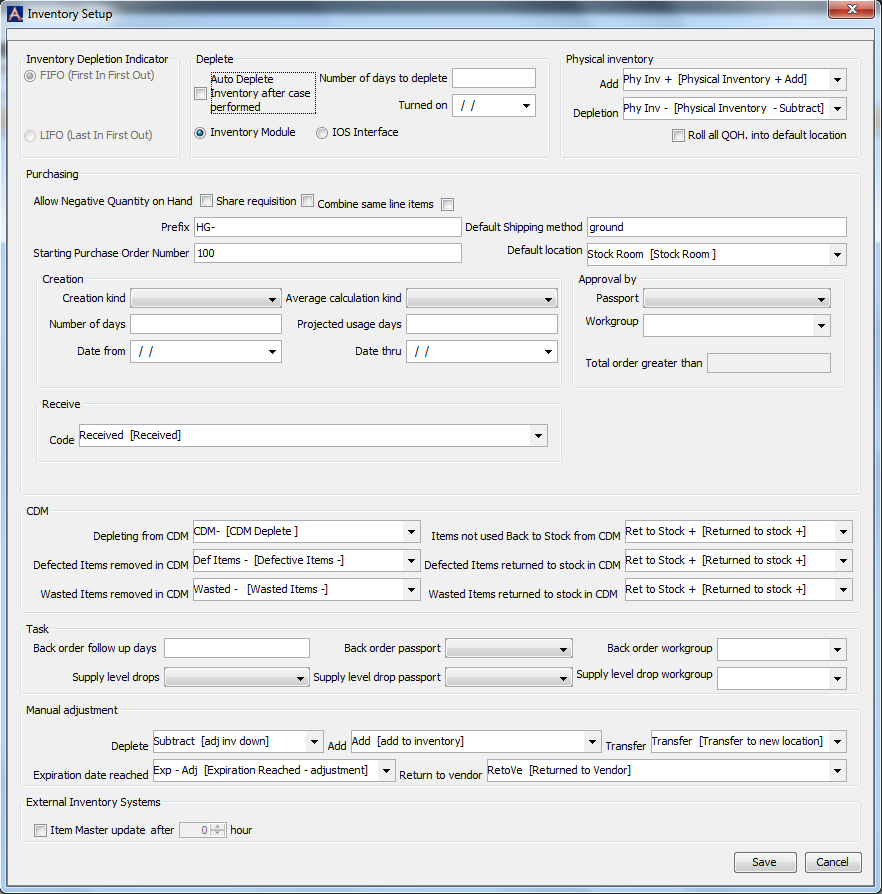 your
expanding text here. dialog, select the Inventory
Transaction code for the following fields:
your
expanding text here. dialog, select the Inventory
Transaction code for the following fields:
Fields in this Section
The following defaults are set for use when the Manual Adjustments are done to items in the system. The fields show active items associated to specific transaction type as entered in the Inventory Transaction Code Dictionary.
Deplete
Select the default adjustment code to be used when items are removed from stock using the Manual Adjustment option.
Supplies used for the week - Subtract
Adjust Invoice Down - Subtract
Add
Select the default adjustment code to be used when items are added to stock using the Manual Adjustment option.
Add to inventory [Add]
Samples from Vendors [Samples]
Transfer
Select the default adjustment code to be used when items are moved from one location to another using the Manual Adjustment option.
Transfer to new location
Expiration Date Reached
Select the default adjustment code to be used when items are removed from stock due to expiration dates having been reached using the Manual Adjustment option.
Expiration Reached - adjustment [Exp - Adj]
Return to vendor
Select the default adjustment code to be used when items are removed from stock and returned to vendor using the Manual Adjustment option. Example: Returned to Vendor
External Inventory Systems
Item Master update after ___ hour
If any interface systems is being used, you can select this and enter the update hours appropriately.
Inventory Management Topics